


UKG Wallet
4.51.86K Reviews
App Specs
- Version
- 1.0.25
- Updated On
- License
- Free
- Downloads
- 100,000+
- Developer
- UKG, Inc.
- Categories
- Business
- Platform
- Android
Screenshots
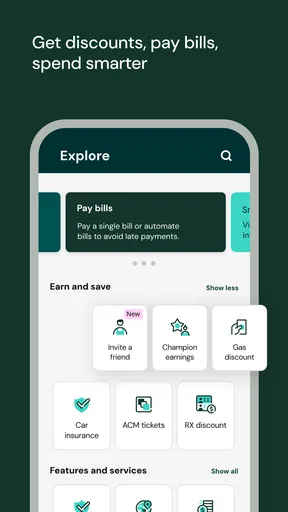
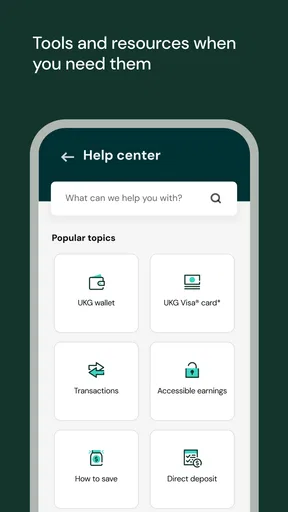
 Analysis by AppCompare
When money is earned but payday is still ahead, the wait can be more stressful than the amount itself. That is the situation I kept in mind while reviewing UKG Wallet, a free business app from UKG, Inc. Its purpose is straightforward: it gives eligible workers access to wages they have already earned, rather than making them wait for the usual payroll date. I found the idea useful, but the experience depends heavily on how an employer has arranged payroll and what the individual user needs from a money-management tool.
This is not a general banking replacement, a budgeting suite, or a way to create extra income. It is better understood as a bridge between completed work and the regular pay cycle. That distinction matters. If you need an occasional way to handle a surprise expense, the app may fit naturally into your routine. If you want detailed spending analysis, long-term savings tools, or complete control over payroll, you will probably need something else alongside it.
From earned hours to usable money
I find it useful to think of UKG Wallet as a narrow handoff: it brings work already completed closer to the moment an expense needs paying, while leaving the regular payroll process in place. In the next section, I’ll look at the practical boundaries around setting it up and why a little preparation matters before relying on it for a time-sensitive bill.
The starting condition: waiting for payday
A realistic use case is easy to imagine. I finish several shifts, but an unexpected bill arrives before my next scheduled paycheck. Under a traditional payroll arrangement, the work has been completed but the money remains tied to the normal pay date. UKG Wallet is designed for that gap. It connects the worker’s earned wages with an earlier point of access, making the timing of income more flexible.
The important word is “earned.” I would not approach this app expecting a loan, a cash advance based only on a promise of future work, or a replacement for an employer’s payroll department. Its value comes from bringing already-earned pay into view. That makes it especially relevant for hourly workers or anyone whose income timing does not line up neatly with rent, transport, groceries, or an urgent household cost.
Before relying on it, I would first check whether my employer supports the service and whether my current work records appear correctly. The app is connected to an employment and payroll workflow, so it cannot be judged in isolation like a simple calculator or note-taking app. The employer’s setup, the timing of reported work, and the way payroll information moves through the system all affect what the user can do.
That dependency is both the app’s strength and its first limitation. Because it is tied to earned wages, the experience can be more meaningful than a generic budgeting app when the immediate problem is timing. At the same time, it means I cannot treat UKG Wallet as an entirely independent financial tool. If the underlying work information has not reached the system, the app cannot magically make that income available.
Worth Reading Before You Choose

EA SPORTS FC Mobile 26 Is a Bigger Football Game, but It Takes Time

Flipboard Shows What News Apps Must Do Beyond the Feed

Switching to Android Auto Means Rethinking Your Driving Routine

Google Calendar Makes a Crowded Week Easier to Manage

Ludo King Makes the Most of the Minutes Between Plans

Baby Panda World Brings Quick Play to Modern Phones, but Its Game Library Feels Busy
Setting up the first step
UKG Wallet is free to download, has an Everyone content rating, and runs on operating systems starting with version 10. I like that the entry point is uncomplicated from a cost perspective: there is no purchase price standing between a worker and the initial evaluation. The app was released on December 21, 2021, and its current version is 1.0.25, so users should still pay attention to compatibility when installing it on an older device.
My practical advice is to begin the setup when I am not already dealing with an urgent bill. That gives me time to sign in, understand what information is available, and see how the app represents my earnings. Trying to learn the workflow while under pressure is a poor way to make a financial decision. A calm first visit also helps separate a genuine payroll delay from a simple misunderstanding about when a shift becomes eligible.
The app’s audience is broad in age, but the useful audience is narrower in circumstance. It suits people whose employer participates and who value earlier access to earned wages. It is less compelling for someone with a fixed salary, substantial emergency savings, or no need to adjust the timing of income. In those cases, the regular payroll process may be simpler, and another financial app may offer more relevant tools.
Following the wage-access workflow
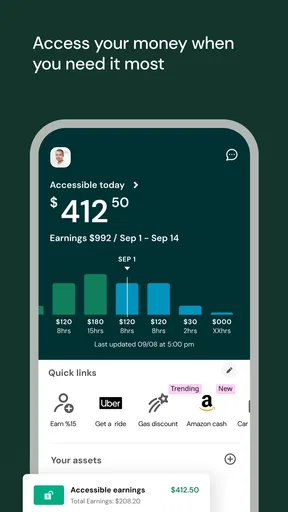
Once the account is ready, I would use the app as a sequence rather than as a place to browse. First, I would look for the amount of wages recognized as earned. Then I would compare that figure with the shifts or work already completed. Only after that would I decide whether accessing money early makes sense for the specific expense in front of me.
This order is one of the most useful habits I took from the experience. Seeing an available amount can create the temptation to use it simply because it is visible. I prefer to treat the displayed balance as information, not as permission to spend. If the need is small and temporary, early access may solve a timing problem. If the need is recurring, it may be a sign that the monthly budget or pay schedule needs a deeper review.
The app is most helpful when I connect it to a concrete plan. For example, I might use an earned-wage option to cover a necessary travel cost that allows me to get to work, then account for the reduced amount at the normal payday. That second step is easy to overlook. Accessing money earlier changes the timing of the cash, not the total amount of work-related income available over the pay period.
I would also avoid making a decision from a single glance. Work records can pass through several stages before they become part of a payroll calculation. A recently completed shift may not appear immediately, and a correction from a manager may need time to travel through the employer’s process. The safest workflow is to compare the app with my own schedule and pay records, then wait or ask the appropriate workplace contact if the figures do not make sense.
The handoff between worker, employer, and payroll
The most important part of UKG Wallet happens behind the screen. The worker supplies the real-world work activity, the employer’s systems record or approve it, and the payroll process determines how that information becomes recognized earnings. The app sits in the middle of that chain, giving the worker a way to interact with the result.
That handoff explains why the app can feel very convenient on one day and limited on another. If the employer’s records are current, the experience can reduce the distance between finishing work and understanding what is available. If a shift is missing, a time entry needs correction, or an employment detail is out of date, the app may appear to be the problem even when the delay began elsewhere.
I would not use the app as the only place to resolve a disputed time entry. If my hours are wrong, the right first conversation is usually with the manager, timekeeping contact, or payroll team responsible for correcting the source record. UKG Wallet can help me notice that something is off, but noticing and fixing are different jobs. This is a crucial distinction for anyone expecting the app to function as a direct customer-service channel for every payroll issue.
The handoff also affects planning. A worker may know exactly how many hours were completed while the system is still processing the information. That creates a small but important gap between personal knowledge and officially available wages. I would therefore keep my own basic record of shifts, especially during busy weeks, schedule changes, overtime, or corrections. It gives me a reference point without turning the app into a source of unnecessary anxiety.
What the result looks like in everyday life
Imagine that I have finished a week of work and my car needs an unexpected repair before the next payday. I open the app, review the earned amount shown there, and consider whether accessing part of it would solve the immediate problem. I then check my upcoming obligations, because the next regular paycheck will reflect the fact that some wages have already been made available.
In that situation, the app’s strongest benefit is not that it changes my income. It changes the timing of access. That can be valuable when a short delay would lead to a late bill, missed transport, or another avoidable disruption. The result is practical rather than dramatic: I get more control over when earned money becomes usable, while still needing to manage the consequences for the rest of the pay period.
I also see a less obvious benefit in using the app as a signal. If I repeatedly need early access, the pattern may reveal that my cash flow is too tight for the current pay schedule. The app can help me identify that pressure because it puts the timing of earned wages in front of me. It does not solve the underlying issue, but it can make the issue easier to recognize and discuss.
For workers with irregular hours, that visibility may be more useful than a static paycheck estimate. The amount associated with completed work can help with short-term decisions, provided I remember that availability and affordability are not the same thing. I still need to leave room for rent, food, transport, taxes, deductions, and other commitments that belong in my normal pay planning.
Where the flow breaks down
The first friction point is eligibility through the workplace. UKG Wallet is not something I would choose solely because the concept sounds useful; I would need the employer relationship to support the relevant workflow. A person can install a free app and still find that it does not meet their needs if their employment setup does not provide the expected access.
The second friction point is timing. A user may finish work and expect the app to reflect it immediately, while the employer’s records are still being reviewed or transferred. That can be frustrating, particularly when the expense is urgent. I would treat a delay as a reason to inspect the work record and contact the responsible workplace team, not as proof that the app has failed.
The third issue is financial discipline. Earlier wage access can be helpful, but it can also make it easier to spend money before the normal payday arrives. I would be cautious if I already struggle to make a paycheck last. In that case, a conventional budgeting app, a written cash-flow plan, or a conversation about pay scheduling may be more helpful than repeatedly moving income forward.
There is also a comparison worth making with ordinary alternatives. A bank account can receive the regular paycheck, but it usually does not provide the same connection to wages earned during the current pay period. A budgeting app can show where money goes, but it generally does not address the gap between work completed and payday. A credit card or loan may cover an emergency, yet those options involve a different kind of obligation. UKG Wallet occupies a specific middle ground: it focuses on access to earned pay rather than borrowing or detailed financial analysis.
That middle ground is useful, but it is not automatically the best choice. If I need a complete view of bills, subscriptions, savings goals, and spending categories, I would choose a dedicated money-management tool as well. If I need to correct hours, I would go to the employer’s timekeeping or payroll process. If I need long-term debt support, I would look for a service designed around that problem. UKG Wallet is strongest when the question is simply, “Can I use wages I have already earned before the scheduled payday?”
Small habits that make the app more useful
I would use three habits to reduce confusion. First, I would compare the amount shown with my personal shift record before making a withdrawal or access decision. This catches missing entries early and prevents me from treating an unfamiliar figure as automatically correct.
Second, I would write down the purpose of any early access and the effect it will have on the next paycheck. That simple note turns an impulsive tap into a deliberate cash-flow choice. It is especially useful when several small expenses appear close together, because each one may feel harmless while the combined effect becomes significant.
Third, I would separate app problems from workplace-record problems. If the screen does not reflect a recently completed shift, I would check whether the shift was submitted, approved, or corrected before assuming the mobile experience is responsible. This distinction can save time and direct the question to the person who can actually resolve it.
A fourth habit is to keep the app in a supporting role. I would not replace my normal bank balance review or monthly budget with it. Instead, I would use it for the narrow decision it handles well, then return to my broader financial picture. That approach preserves the convenience of early wage access without allowing one feature to become my entire money plan.
Who should use it and who should skip it
I would recommend UKG Wallet to an eligible worker who sometimes faces a mismatch between the day expenses arrive and the day regular wages arrive. It can also suit people who want a clearer view of earned income during the pay period and who are comfortable planning around the effect of accessing it early.
I would be more cautious recommending it to someone who expects a full-service banking experience. The app’s value is focused, and that focus is a benefit only if it matches the problem. People who need investment tools, detailed spending reports, extensive account management, or a replacement for payroll support should look elsewhere or use additional services.
The public response suggests that many users find the concept worthwhile: UKG Wallet holds a 4.5 average from around 12 thousand ratings and about 1.9 thousand written reviews. It has passed 100 thousand installs, which gives it a meaningful presence without making popularity a substitute for personal fit. I read those figures as evidence of interest in the workflow, not a guarantee that every employer connection or payroll situation will feel smooth.
My final assessment
After following the process from completed work to a possible early-access decision, I see UKG Wallet as a focused tool with a clear practical role. It helps address the uncomfortable space between earning money and receiving it on the standard schedule. The best experience comes when the employer records are current, the user understands what the available amount represents, and the decision is tied to a specific short-term need.
Its limitations are equally clear. It depends on workplace and payroll handoffs, it is not a solution for incorrect time records, and it can encourage poor cash-flow habits if used without a plan. Those are not reasons to dismiss it; they are reasons to use it deliberately.
My recommendation is to treat UKG Wallet as a timing tool, not extra money. For an eligible worker facing occasional pressure before payday, that distinction can make the app genuinely useful. For someone seeking a complete financial-management system or a way to fix payroll issues directly, a different option will be better. UKG Wallet earns its place when the problem is precise, the workflow is supported, and the user is prepared for what early access means for the next pay cycle.
UKG, Inc. has kept the product’s purpose easy to understand, and the free entry point makes it reasonable to evaluate in a real employment context. I would install it, inspect how my earned wages appear, and test my understanding before depending on it during an emergency. Used with that patience, earned-wage access can be a useful addition to everyday financial planning rather than a source of new surprises.
Pros
- Supports convenient digital access to pay and HR information.
- Useful for employees managing work-related details on mobile devices.
- Can reduce the need for paper documents and manual requests.
- Provides a centralized place for selected workplace services.
- May offer timely updates when payroll or HR information changes.
Cons
- Requires employer participation and may not work for every UKG account.
- Some features depend on your company’s configuration and permissions.
- Login or verification issues can prevent access when needed.
- The app may feel unnecessary for employees with limited HR needs.
- Availability of features can vary between regions and organizations.
FAQs for UKG Wallet
What is UKG Wallet and how does it work?
UKG Wallet is a financial wellness feature connected with participating UKG workforce-management systems. It may allow eligible employees to view earned wages, access available pay before the regular payday, and review related payment information through a mobile app. Availability depends on the employer’s UKG setup, payroll configuration, location, and employment status, so not every UKG user will automatically have access to every feature.
Who can use UKG Wallet?
UKG Wallet is generally intended for employees whose employer has enabled the service and whose payroll or workforce platform is supported. Simply downloading the application does not guarantee access. During registration, you may need to verify your identity using personal and employment details. Eligibility can also depend on your employer’s policies, pay cycle, hours worked, and whether your earnings have already been processed by payroll.
Can UKG Wallet help me access my paycheck early?
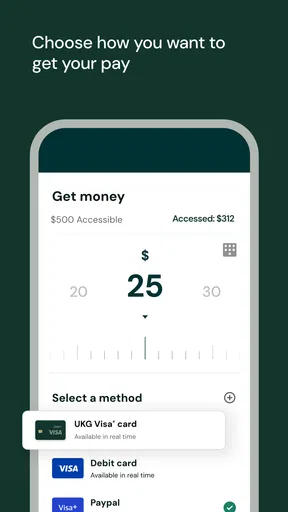
In supported workplaces, UKG Wallet may provide access to a portion of wages that you have already earned before the scheduled payday. The amount shown can change as your employer records working hours, deductions, and payroll information. Early access is not necessarily available for all earnings, and applicable transfer methods, limits, processing times, or fees may vary. Check the in-app disclosure and your employer’s terms before requesting a transfer.
Is UKG Wallet safe to use?
UKG Wallet is designed to handle employment and payment-related information, so account security is important. Use the official app store listing, create a strong unique password, and enable available security features such as device authentication or multi-factor verification. Never share login codes with anyone. Before using the service, review its privacy policy and understand what information may be collected, processed, or shared with your employer and financial service providers.
Are there fees or limitations when using UKG Wallet?
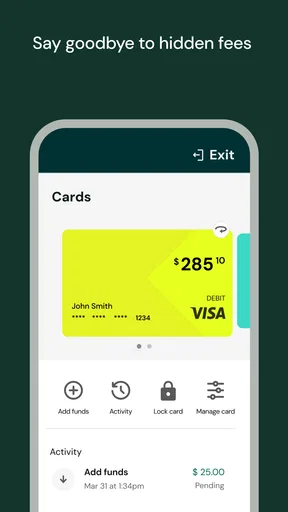
UKG Wallet features, transfer options, and pricing may differ according to your employer’s agreement and the method you select. Some services may be free, while expedited transfers or specific payment options could involve charges. There may also be limits on transfer amounts, frequency, eligibility, and timing. Carefully review the confirmation screen, fee disclosures, and applicable terms before completing any transaction, especially if you need funds immediately.


